
earnify
BP Products North America IncTravel & Local
4.75.13K Reviews
- Version
- 5.18.1
- Installs
- 1.00M
- Age Rating
- Everyone
Screenshots
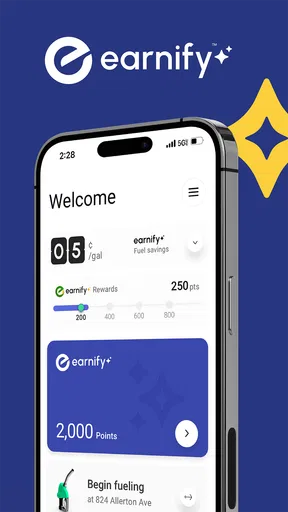
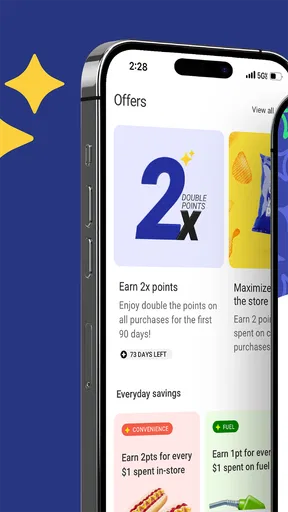
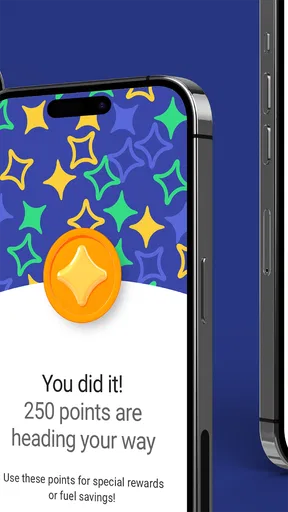
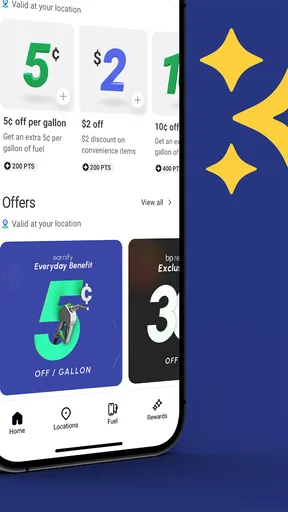
Our Review of earnify
 Analysis by Appyee
When I need fuel on a day that is already packed with errands, I want to make the stop count without turning it into a second job. That is the practical appeal of earnify: it is a free travel and local app from BP Products North America Inc, built around saving on gas and convenience purchases. I see it as a companion for people who already stop at participating places, rather than a general-purpose deal finder that will change where they shop.
The useful question is not simply whether an app can offer savings; it is whether checking it fits naturally into a routine. If I can look before leaving, make a sensible choice at the pump, and keep moving, the app has done its job. If I have to detour, compare too many conditions, or remember a separate process each time, the value becomes less convincing.
Start with the trip you already planned
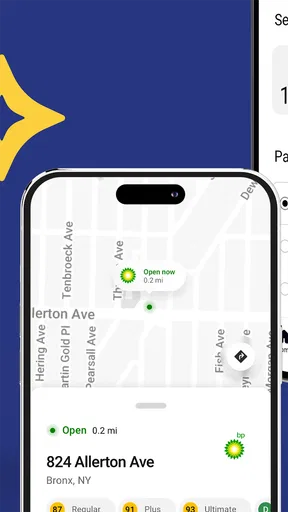
For me, the easiest way to judge a fuel-focused app is to begin with an ordinary trip rather than a special outing. Imagine I am heading across town for groceries and notice the fuel gauge is low. I would check earnify before setting off, see whether a nearby BP-related stop makes sense for the route, and decide whether any available savings are worth using. That keeps the app in the role of a helper, not the reason for making an unnecessary drive.
This distinction matters because fuel savings are only useful in context. A lower-cost stop that adds a long detour may not be a real saving once time and extra driving are considered. I would compare the route with the stops I already pass and treat convenience as part of the calculation, not as an afterthought.
Make the check part of the routine
My practical approach is to open the app before I pull out of the driveway, when I can focus on the options instead of trying to make a decision at the pump. I would check the location and any relevant offer details, then decide whether to use them. That small habit also helps avoid the frustration of discovering a condition only after I have started filling up or buying something.
For a regular commute, I would make the check occasional rather than compulsive. If my route and usual stop have not changed, repeatedly reopening an app may not add much value. It is more useful when I am planning a longer drive, traveling through an unfamiliar area, or already expecting to stop for a snack or other convenience item. The time to check is when a choice is still open.
Where earnify fits among travel apps
Unlike a navigation app, earnify is not the tool I would rely on to plan every turn or avoid traffic. And unlike a broad shopping-rewards app, its appeal is tied more closely to fuel and convenience stops. I would keep a map app for route decisions and use earnify for the question of whether a relevant stop or saving fits that route. The two jobs can complement each other, but they are not interchangeable.
That focus is a strength if BP is already part of your travel routine: there is less reason to sort through offers unrelated to a fuel stop. It is also a limitation if you choose stations solely by location, price, or whichever brand is closest. In that case, a map or fuel-price comparison tool may be more useful as your first stop, with earnify worth opening only when its participating locations line up with where you are going.
Getting Started with Earnify
So, what exactly is Earnify? In simple terms, it’s an app that promises to help you earn extra cash, rewards, or gift cards by completing various tasks. Think of it as a side hustle that fits right into your pocket. From surveys to watching videos, there’s a smorgasbord of activities to choose from.
Installation was a breeze. I hopped onto the app store, downloaded it, and within minutes, I was setting up my profile. The interface is pretty clean, which I appreciate because who wants to spend forever trying to figure out where everything is, right? The onboarding process was straightforward, and soon enough, I was ready to start earning.
The Earning Experience
Once I got the hang of it, I dove into the different tasks available. Each task clearly showed the potential earnings and time commitment, so I could easily pick what suited my schedule. Some of the surveys were actually pretty engaging, while others, well, let’s just say they were a bit of a snooze fest.
Watching videos turned out to be my favorite way to rack up points. It was like getting paid to watch ads, which is something I’d already been doing for free! There’s something oddly satisfying about converting downtime into tangible rewards. And speaking of rewards, the app offers a decent variety of options, from PayPal cash to popular gift cards.
Features That Stand Out
One feature I found particularly useful was the referral system. By inviting friends to join, you can earn a percentage of their earnings. It’s a neat way to boost your points without much extra effort. Plus, the app regularly updates its tasks, so there’s always something new to try.
The Earnify team also seems pretty responsive, with regular updates and a dedicated support section. It’s clear they’re keen on keeping their user base happy and engaged.
Final Thoughts
So, is Earnify worth your time? If you’re looking for an easy way to earn a bit of extra cash or rewards during your downtime, I’d say give it a shot. It’s not going to replace your day job, but it’s a fun and straightforward way to earn some perks here and there. Just remember, like any side hustle, the key is consistency. Happy earning!
What to expect at the pump
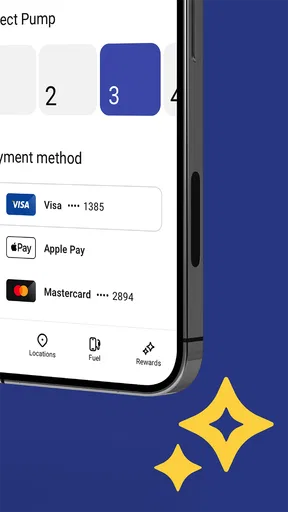
The handoff from planning to paying is where a fuel app has to prove itself. I would check the offer before arriving, then read its terms carefully enough to know whether it applies to the purchase I am about to make. A discount that depends on a particular location, product, or payment step is only helpful if I know that before I am standing at the counter. The best habit is to confirm the details while I still have time to choose another stop.
I would also avoid assuming that an app automatically changes the price shown on a pump or that every purchase earns the same benefit. Offers can have their own conditions, so I would follow the instructions shown in the app and keep an eye on the final receipt. If the result does not look right, saving the receipt and noting the location and time gives me a clearer starting point when contacting support than trying to reconstruct the stop later.
Small habits that make the app more useful
One non-obvious tip is to check before deciding where to stop, not after pulling into a station. That simple order protects the value of the offer from being erased by a detour. On a road trip, I would check at a planned break when I can compare options calmly, rather than while driving; the driver should never handle the phone in motion. A passenger can do the checking, or I can set up the stop before departing.
Another useful habit is to treat convenience purchases as a separate decision. If I am stopping only for gas, I would not buy extra snacks just because an offer makes them feel cheaper. If I genuinely need coffee or a quick item, then checking whether there is a relevant saving makes sense. This keeps a rewards app from nudging me into spending more than I intended.
I would also decide in advance how much attention I want to give the app. A quick pre-trip check is reasonable; constantly refreshing for a better deal is not. The savings should fit around the journey rather than dictate it. That is especially important for people who drive irregular routes, where a familiar station may not be convenient each day.
Who is most likely to benefit
I would recommend trying earnify if you regularly pass participating BP locations and are comfortable checking an offer before paying. It is a better fit for someone who can make the app part of an existing fuel routine than for someone who rarely drives or shops at unrelated locations. The app is free, so testing whether it suits your habits does not require paying for access, but your time and attention still have value.
It may also suit a household where one person plans the route and another handles the stop. Agreeing on the location and checking the offer beforehand can make the handoff simple. For a solo driver, the equivalent is doing that planning while parked at home. In both cases, the goal is to arrive knowing what you intend to do, not to troubleshoot an offer while people are waiting behind you.
I would skip it as a primary savings tool if your main priority is always the lowest available fuel price, regardless of brand. A dedicated price comparison or map tool is usually a more direct way to compare nearby stations. Likewise, if there is no convenient participating stop on your normal route, the app is unlikely to justify a special trip just for a possible perk.
Questions worth settling before relying on it
A common practical question is whether I need an account to make the app useful. The earlier setup flow suggests creating a profile, so I would expect to complete that before counting on an offer or tracking benefits. I would use my regular details carefully and read the in-app prompts, especially if the app asks me to confirm anything before a purchase. For a quick one-off stop, setting up an account may feel like more effort than the benefit is worth.
Another question is whether every BP stop will offer the same deal. I would not plan around that assumption: I would check the specific offer and location displayed in the app each time. The same caution applies to convenience purchases. If I cannot see a clear match for what I intend to buy, I would proceed as though the purchase has no special saving rather than relying on a guess.
People also want to know whether rewards make a meaningful difference. My answer is to judge the outcome after a few normal stops, not from the excitement of a single offer. If the savings arrive without extra driving or unplanned spending, they are useful. If I have to change my route or make purchases I would not otherwise make, the apparent reward can be misleading.
Compatibility, trust, and staying current
On Android, the current release is version 5.6.1 and the minimum operating system is Android 10. The app is rated for Everyone, and its average rating is 4.7 from around 31,000 ratings, with about 3,200 written reviews and over one million installs. Those figures suggest that it has found an established audience, but they do not tell me whether the offers will suit my particular route; that still comes down to location and routine.
Because offers and app screens can change, I would keep the app current and read the terms shown at the moment I plan to use a deal. I would also avoid treating an old screenshot or a friend’s past experience as a guarantee that the same offer is available to me. The app is free and was released on May 21, 2024, but the lasting question is simpler: does it make your regular stop easier or cheaper without adding hassle?
When another tool is the better choice
For route planning, traffic, and finding a stop while traveling, I would still open a dedicated navigation app. For comparing prices across brands, I would use a fuel-price tool or map search first. earnify has a narrower role: it can make sense when its locations and offers align with a trip I already intend to take. That division of labor is more realistic than expecting one app to solve every part of a drive.
My overall view is that the strongest result comes from a simple workflow: plan the stop, check the relevant offer while parked, follow its conditions, and review the receipt afterward. If that sequence feels natural and the location suits your route, earnify can be a handy addition. If the process feels like another errand, or if your travel choices are driven by whichever station is cheapest and closest, I would stick with the tools that answer those needs directly.
Privacy and Permissions
See what permissions an app requests and how it handles your data.
- Location
- approximate location (network-based), precise location (GPS and network-based)
- Camera
- take pictures and videos
- Wi-Fi connection information
- view Wi-Fi connections
- Other
- view network connections, connect and disconnect from Wi-Fi, expand/collapse status bar, full network access, run at startup, reorder running apps, prevent device from sleeping, read Google service configuration
Verdict
Strengths of earnify
- User-friendly interface for easy navigation.
- Wide variety of earning opportunities available.
- Real-time tracking of earnings and tasks.
- Secure payment methods ensure safe transactions.
- Regular updates with new features and tasks.
Limitations of earnify
- Limited to certain geographic regions.
- Some tasks may have low payouts.
- Requires stable internet connection.
- Occasional bugs can hinder performance.
- Notifications can be overwhelming at times.
Similar Picks in This Category
View All
Google Maps
Google LLC3.4

Google Maps Go
Google LLC4.1

Booking.com: Hotels & Travel
Booking.com Hotels & Vacation Rentals4.8

Google Earth
Google LLC3.8

Skyscanner Flights Hotels Cars
Skyscanner Ltd4.8

trivago: Compare hotel prices
trivago N.V.4.4
Frequently Asked Questions
What is Earnify and how does it work?
Earnify is a comprehensive financial management app designed to help users track expenses, set budgets, and achieve financial goals. It offers features like expense categorization, income tracking, and personalized financial advice. Users can link their bank accounts for real-time transaction updates, ensuring a seamless financial overview and better money management.
Is Earnify secure for managing my financial information?
Yes, Earnify prioritizes user security by employing bank-level encryption and secure data storage. The app requires two-factor authentication for account access, ensuring that your financial information is protected from unauthorized access. Regular security audits and updates further enhance its reliability and safety for users.
Can I use Earnify without linking my bank account?
Absolutely, Earnify offers flexibility by allowing users to manually input transactions if they prefer not to link their bank accounts. While linking provides real-time updates and convenience, manual entry ensures users can still benefit from the app's budgeting and tracking features without compromising personal comfort.
Does Earnify offer customer support if I encounter issues?
Yes, Earnify provides robust customer support through multiple channels including email, live chat, and an extensive FAQ section on their website. Users can reach out with technical queries or feedback, and the support team is dedicated to offering prompt and helpful responses to ensure a smooth user experience.
Are there any in-app purchases or subscription fees for Earnify?
Earnify offers both a free version and a premium subscription. The free version includes basic budgeting tools, while the premium version unlocks advanced features such as personalized financial insights and ad-free usage. Users can choose a monthly or annual subscription plan, depending on their financial management needs.
